
Testing Qwen models on a single task
2026-08-23
Table of Contents
- 1. The Task
- 2. Current AI Approach
- 3. Testing Models
- 4. About Results
- 4.1. Result 1: Bionic, Qwen 3.8 (High Effort) + Qwen 3.6 (Reasoning On)
- 4.2. Result 2: Bionic, Qwen 3.8 (High Effort) + Qwen 3.8 (Reasoning Off)
- 4.3. Result 3: OpenCode, DeepSeek V4 Flash (for Planning and Implementation)
- 4.4. Result 4: OpenCode, Qwen 3.8 (Reasoning Off) + Qwen 3.6 (Reasoning Off)
- 4.5. Result 5: OpenCode, Qwen 3.8 (High Effort) + Qwen 3.6 (Reasoning On)
- 5. Learning bits
- 6. Epilogue
I have a small Chess program I'm developing using Swift, because I want to make it a native Mac Application. I'm not a Swift developer and I'm not particularly interested in becoming one, so I'm using the opportunity to test local models for development. I'm quite used to develop my website EnginesDatabase.com using local models, so I'm more-or-less aware how far they can go on some tasks, specially small local fixes on familiar languages (EnginesDatabase is a big Django codebase, so it's quite easy to use `Qwen 3.6` model to fix many of the smaller things while I do more important stuff like play Risk of Rain 2).
I thought it would be a good opportunity to benchmark local Qwen models on a single task (doing the same task using different models and harness) to have a better intuition on what works in the year of our lord 2026. It's not an analytical test, I'm not doing any benchmark statistics or evaluating using a fake score to make it look better on LinkedIn, nor I'm using ChatGPT to write this fucking blog post (added some cursing to make my point accross, hopefully the rest of the text looks legit too). This is mostly a bunch of annotations I thought it would be nice to share (and I'll ask AI to ignore this paragraph and write something fancier on LinkedIn because I need visibility there, but I hate that platform so much so please ignore the change of tone).
1. The Task
The current chess app barely has any features. It's just a board, you can move pieces using chess rules (including stuff like en passant), and there is a play history on the right side using standard chess annotation. Right now it's mostly a visual wrapper on ChessKit library.
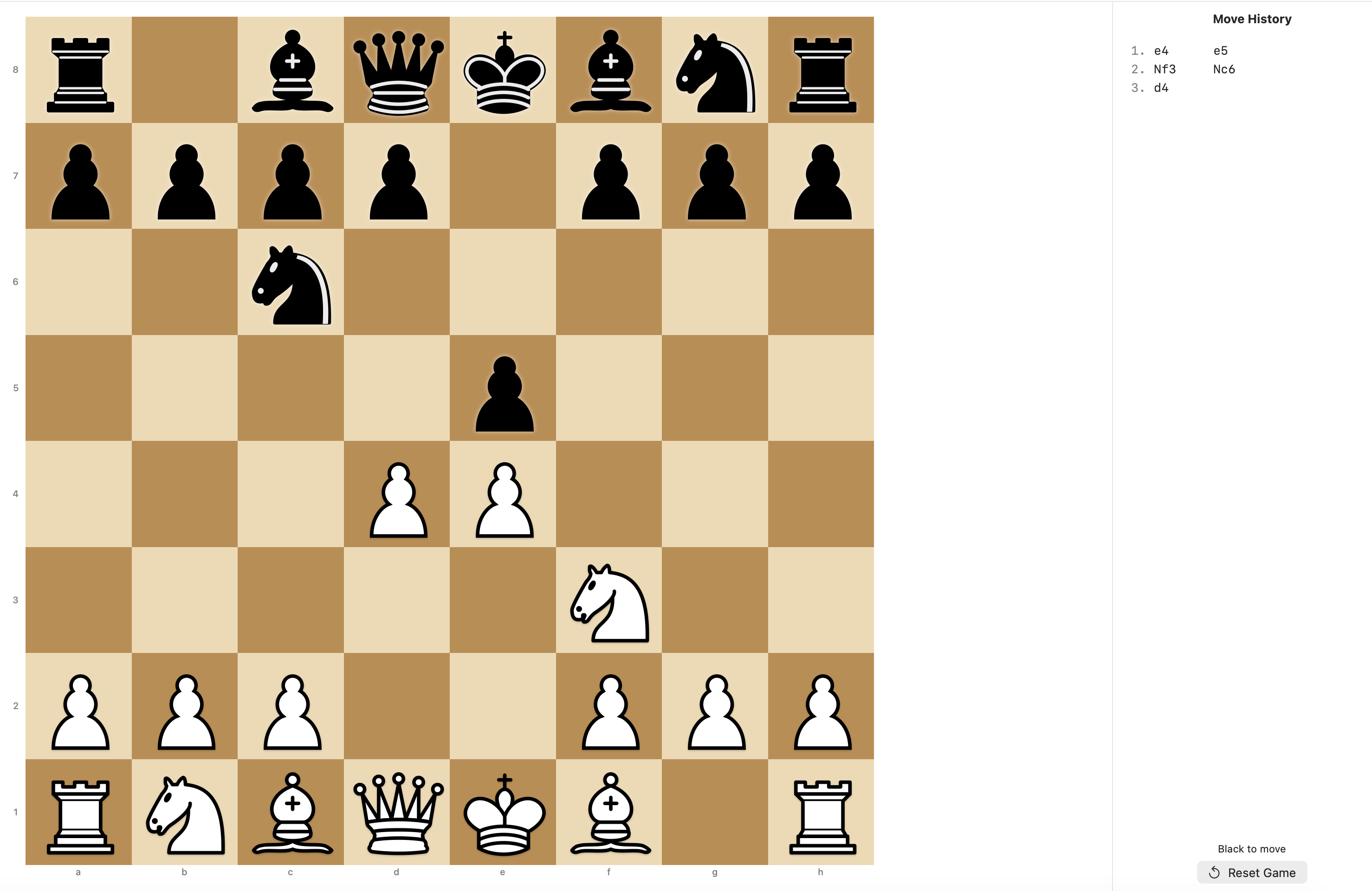 You might need to zoom in a little bit, I took the screenshots before going to sleep.
The task I wanted to add is rolling back on the match history when you click on a move and allowing the user to create a branch of alternative moves. This is similar to tools in websites such as `Chess.com` and `Lichess.com` - basically, when studying a match, the user can go back to a any move and from there create an "alternative timeline" of moves without losing the rest of the match history. On those websites the tool is much more feature complete (you can "swap" the main timeline with the alternative branch, delete alternative branches, etc) - here, I only want to allow alternative branches and show them on the match history, without swapping or allowing any other way to edit the match history.
2. Current AI Approach
The way I currently develop using local models is by adding to `AGENTS.md` a prompt to document plans on a `.plans/` folder (in a `XX.FEATURENAME.md`, using increasing numbers), and asking me as many questions as necessary so the plan is absolutely clear. Then I use the AI in two separate sessions with clean context:
- With a strong reasoning model: "Create a plan for the following feature: [yada yada description of the feature I want]", answer all the questions, and check the plan document the AI created. Normally I don't change anything, I just skim to understand a bit what the AI is planning on doing.
- With a faster model: "Implement the plan described in @.plans/XX….".
This helps me track what the AI is doing, and having a fixed point in time where I can control the context before implementation with a static document. I find that if a task starts going wrong, it's easy for the AI to snowball in further confusion and waste a lot of tokens in a fruitless effort, so instead I'm aiming for a "oneshot or nothing": if things start to go wrong, I stop the implementation, double check the document if there was something stupid or missing, and ask the AI to rewrite the document with a new specification. If things still go wrong, I break the task and try again. With OpenRouter, this strategy worked quite well for me using e.g. Opus 4.8 for planning and DeepSeek v4 Flash for implementation (with Opus spending as much as 100x more than DeepSeek).
3. Testing Models
My main local drivers are Qwen 3.6 and Qwen 3.8 (27B parameters, 4bit quantization, MLX model because I'm running on a MacBook M4 Max 64gb) using Bionic (the harness from the peeps that made LM Studio), and my intuition is that "Qwen 3.8 on Extra High effort is a good reasoning model for planning, Qwen 3.6 is smart and fast enough for implementation", but I wanted to test:
- Variations in effort.
- How much I would spend (money and time) if I used DeepSeek v4 Flash on OpenRouter instead, for both planning and implementation.
- The different results with the same given prompt.
4. About Results
The results table is as follows:
| Plan Harness and model | [Bionic] Qwen3.8, high effort | [Bionic] Qwen3.8, high effort | [OpenCode] Deepseek V4 Flash (OpenRouter) | [OpenCode] Qwen3.8, No Reasoning | [OpenCode] Qwen 3.8 high effort |
| Plan time | ~100min | ~100min | 20min, $0.03 | 40min | 86min |
| Implementation | [Bionic] Qwen3.6, Reasoning On | [Bionic] Qwen3.8, No Reasoning | [OpenCode] DeepSeek v4 Flash | [OpenCode] Qwen 3.6 Reasoning On | [OpenCode] Qwen 3.6 Reasoning On |
| Implementation time | ~30min | 1h+ | 24min, $0.08 | 15min | 36min |
Tracking time in Bionic was more difficult than OpenCode because it would often crash the rendering window on long tasks, so I needed to restart the application and continue the task from that point on.
4.1. Result 1: Bionic, Qwen 3.8 (High Effort) + Qwen 3.6 (Reasoning On)
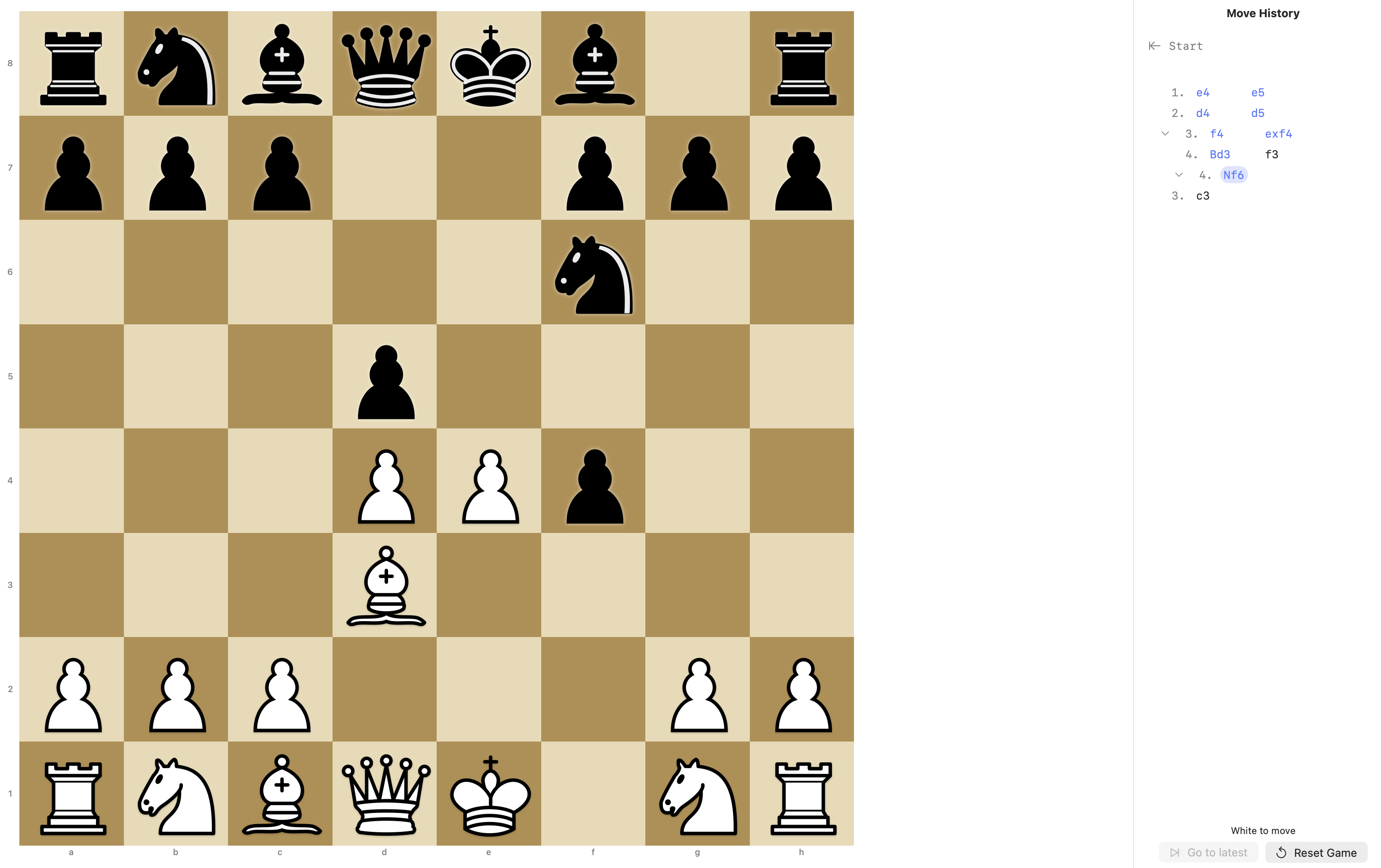
That's the baseline I'm used to, and it worked perfectly well. On Bionic, the model asks questions by providing enumerated questions, and it waits your next prompt before working on the plan document. Worth mentioning Bionic has no "Plan" vs "Build" agents distinction that OpenCode has, which is honestly quite fine. I feel models nowadays are smart enough (specially on fresh contexts) to follow simple guidelines, which in my case basically means "If I'm asking you to plan something, you ask me tons of questions and write the plan on that folder".
100 minutes is quite a long time to run the model though, and specially on Bionic, having to restart the application to visualize progress was quite cumbersome, but the result worked out of the box exactly as I expected. One thing that might have helped was to answer the questions by writing answers instead of selecting checkboxes, but I'm not 100% sure. You can see on the image the Move History is quite clear.
4.2. Result 2: Bionic, Qwen 3.8 (High Effort) + Qwen 3.8 (Reasoning Off)
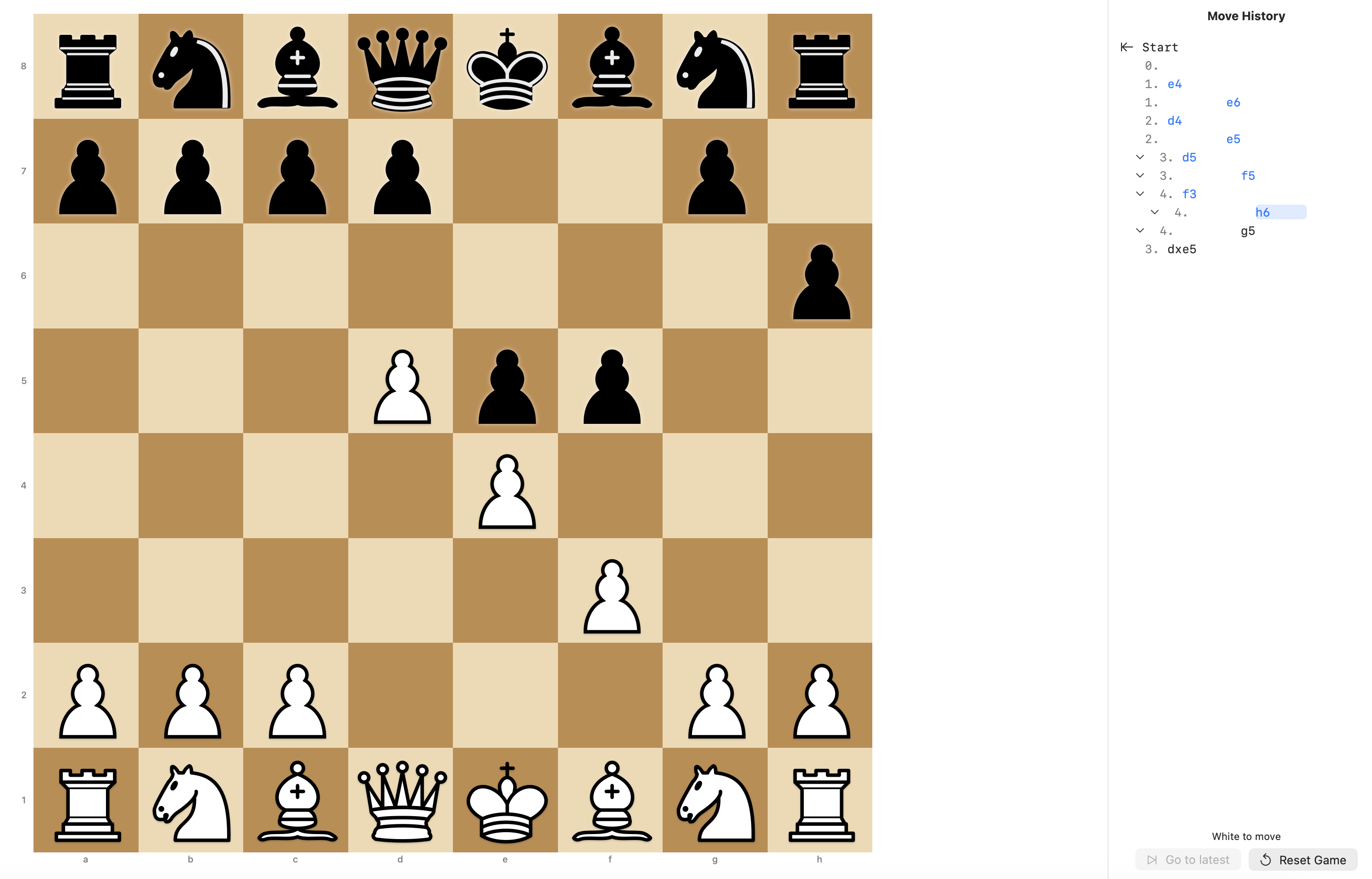
The idea was to try using Qwen 3.8 as the implementation model too (since it's a quite capable model), but it taking more than an hour to code was a weird scenario for me (and make it not viable for this). It seemed like it got up on a strange loop of trying to test the application too hard (Qwen 3.8 does seem to try testing as much as it can, even with some guidelines to ignore testing). Result was OK, although it decided it was best for moves to be on different lines. The one clear error you can't blame the prompt is starting the move history at an empty 0.
4.3. Result 3: OpenCode, DeepSeek V4 Flash (for Planning and Implementation)
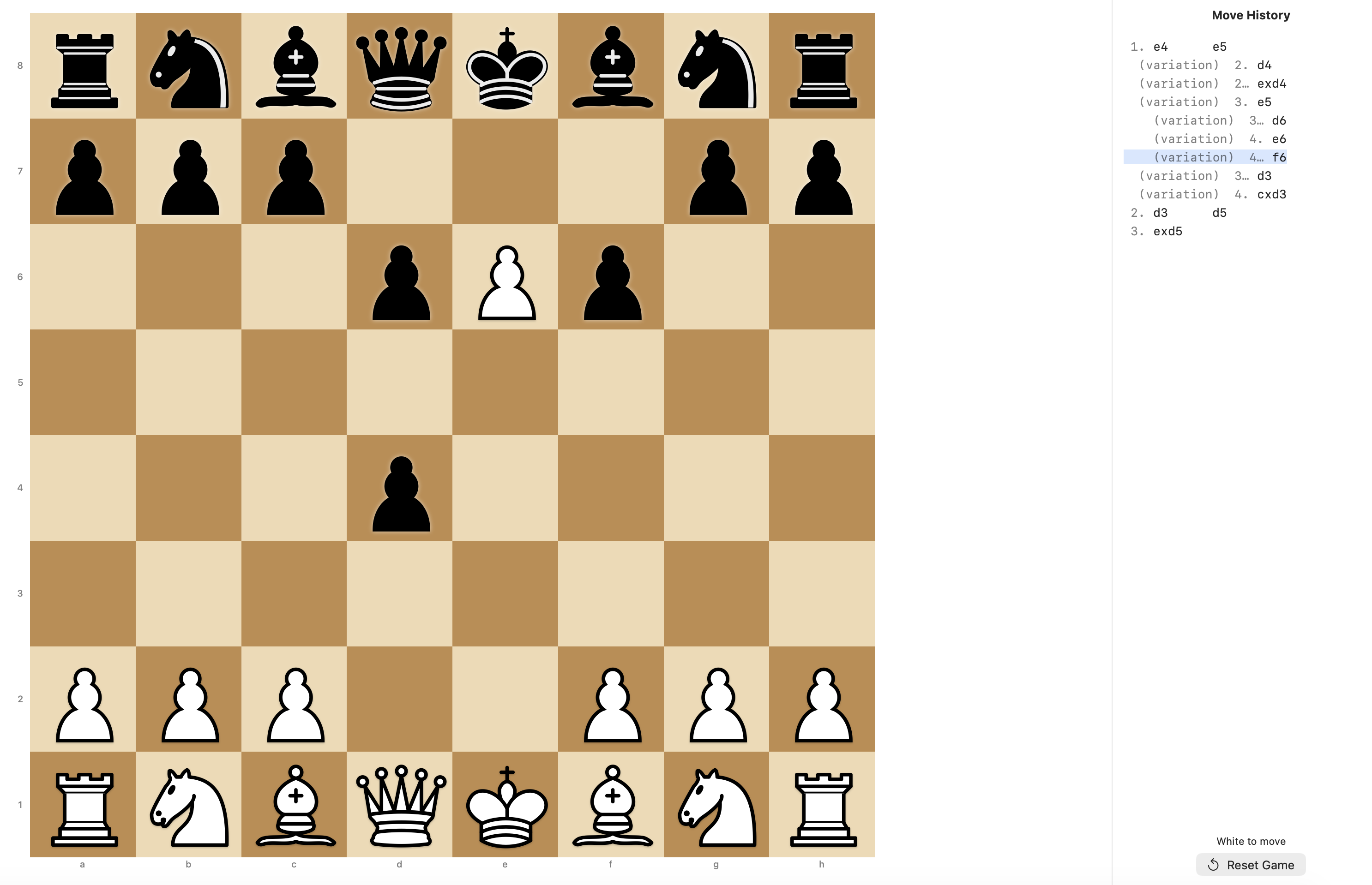
As expected, DeepSeek is a monster of cost efficiency. The output is not as good as Qwen3.8/Qwen3.6 combo (it decided for a weird "variation" annotation for every move of the branch), but $0.10 to build the basic feature in less than half the time is an amazing deal. I'd only spend a couple of cents more to fix it exactly the way I want.
The biggest problem is how Swift packages are ingrained in my system. The way it is, if the coding agent needs to read the library I'm using, it needs to request access to the Library folder. There must be a way to set up vendors in the folder, but since this is the "default" setting, there might be some other unknowns that makes me unconfortable giving a lot of access to a remote agent.
4.4. Result 4: OpenCode, Qwen 3.8 (Reasoning Off) + Qwen 3.6 (Reasoning Off)
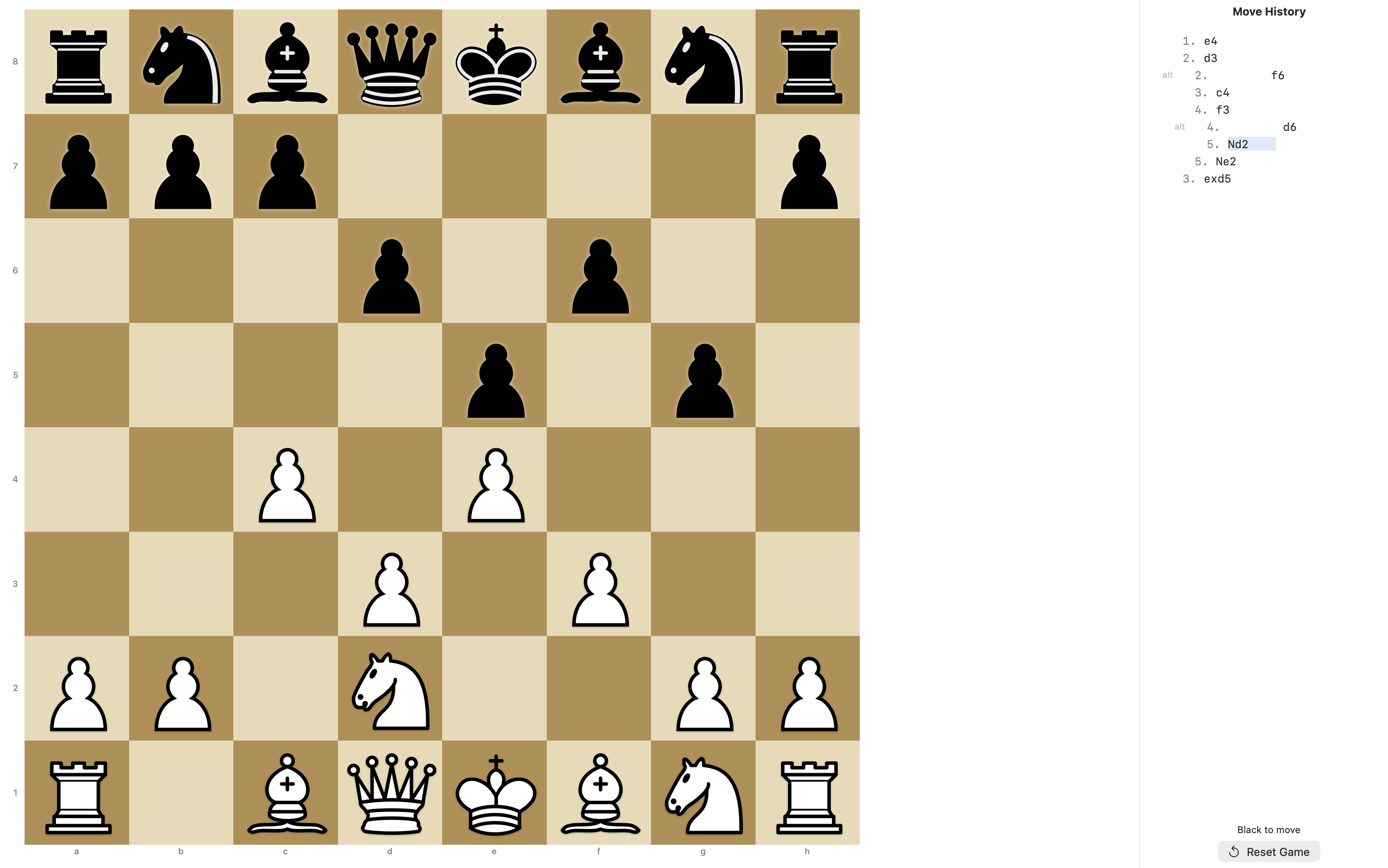
I tried testing the "fastest" approach, and the result was what I expected. It is somewhat functional, but black pieces move are not shown in the move history unless you are branching. Checking the plans, Qwen 3.8 with reasoning off made a shorter plan (360 lines vs 560 lines of the original Qwen 3.8 with High Effort).
4.5. Result 5: OpenCode, Qwen 3.8 (High Effort) + Qwen 3.6 (Reasoning On)
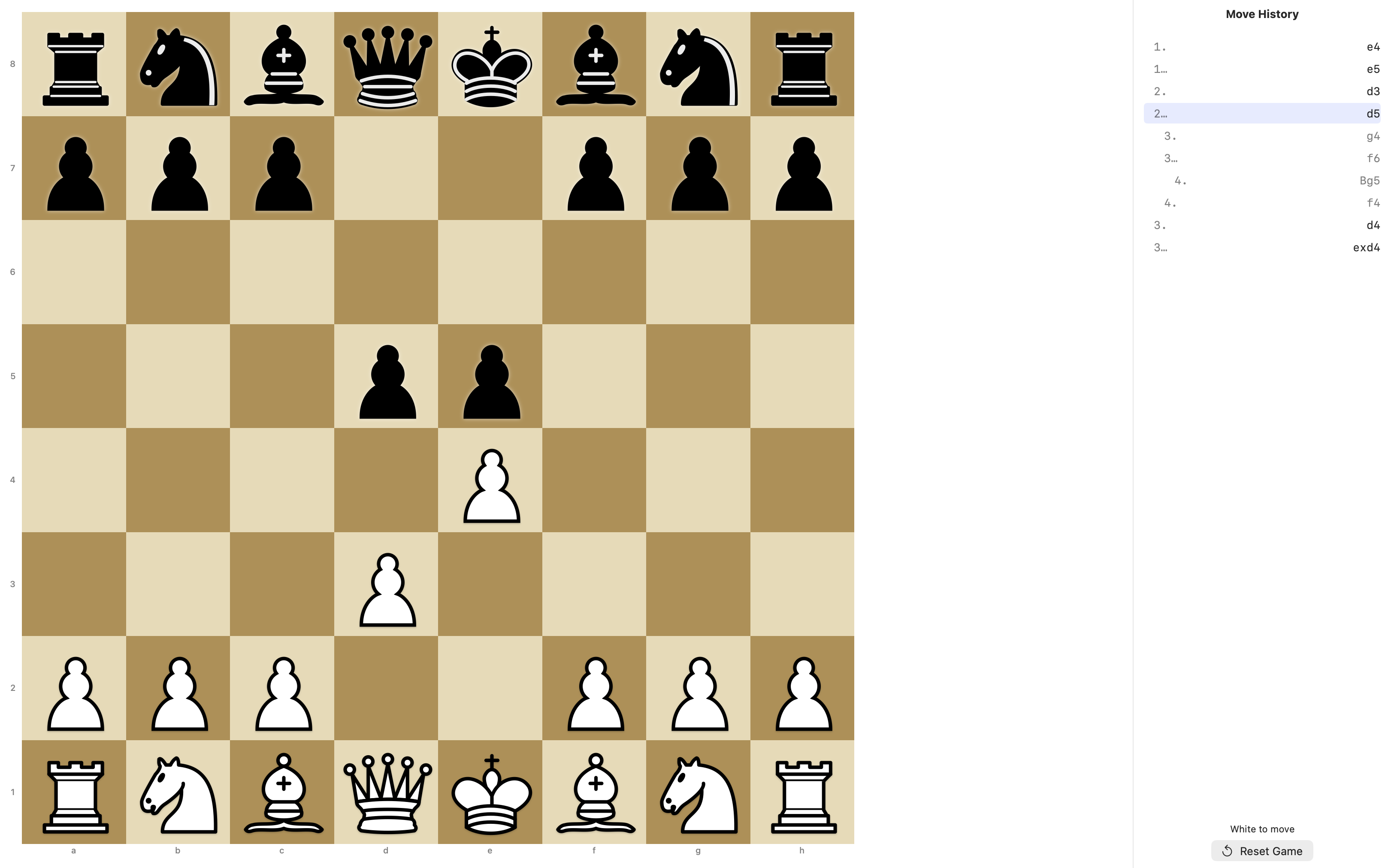
It's interesting that the same models under a different harness gave me the feature in a very different way. I did ask very similar questions when running the same models on Bionic, but I don't remember if the answer was so different - and in any way, the fact is that this would be the "default" stylistic choice for the Move History (give every move a different line so the whole thing can be a button).
It did take a little bit less than Bionic, and I like the fact that OpenCode makes it much easier to track tokens and time. But Bionic development story feels much better to me (what can I say besides the fact that I'm writing this blog post on my Emacs running on a GUI, not on the terminal).
5. Learning bits
- OpenCode was really nice to work with, but the integration with LM Studio is quite bad. Models are not auto-discovered when I connect to my local LM Studio server, and documentation does a bit of a disservice in explaining how to configure the variations with different efforts for the same model, and turning on/off reasoning. That's one of the reasons why I couldn't test Qwen 3.6 with Reasoning Off on OpenCode.
- Bionic is still my main harness driver and it works incredibly well with LM Studio (ofcourse, same people working there), but there is one annoying bug where long tasks might break the render of the Bionic window, forcing me to restart the application to see the progress of the task. It also doesn't provide some niceties from OpenCode, like the model asking you questions in the form of checkboxes (the model can still ask questions and wait for the next prompt, mind you; but the checkboxes with prepped answers are a nice addon).
- DeepSeek is quite good and has an insane cost benefit, but at the end of the day I'm still worried about some permissions a model running remotely might have, specially when Swift/XCode forces me to give permission to the Library folder so the model can have access to whatever library I'm using on the project.
- In general, I think my current approach of "Qwen 3.8 [High Effort]" for planning and "Qwen 3.6 [Reasoning Enabled]" for implementation works quite well for local development. Most of the time I can just "fire-and-forget" while I do other stuff on the computer.
- Qwen 3.8 is quite different than Qwen 3.6. Qwen 3.8 seems like it's trying too hard at times, even with reasoning off. But it is a very capable agent if you're okay with the time it is going to spend at stuff.
6. Epilogue
There are TOO MANY posts about AI already and writing one more doesn't feel particularly good, but one thing that made me a bit motivated to write this post is the fact that local models nowadays are very good for many tasks, specially with a good prompt and harness strategy. And in the offchance this motivates other developers to explore local models and get rid of their cloud dependency, the better. Advocating for personal computing freedom from a MacBook M4 Max feels weird, but I have seen weirder. We're living in interesting times, after all.